|
|
The Return of the HP LaserJet Font Cartridge?
USB Font FlashDrives
are used in the newest HP LaserJet printers as an additional
method of adding fonts. The following LaserJet printer models
all have 2 internal ports available (behind a removable side
panel) for inserting the USB FlashDrive:
LaserJet P3015, P3005, P4014, P4015, and P4515 series printers
and M3027 and M3035 multi-function models.
In addition, the new LaserJet P3015 series printers have one
USB FlashDrive port on the front of the printer and the P4014,
P4015 & P4515 printers have one USB FlashDrive port at the
rear of the printer. These easy access ports are simple convenient
ways to add security sensitive fonts (such as signatures) to
the printer when printing checks. The USB Font FlashDrive is
easily removed when the check run is finished.
Note: the printer must be powered off whenever the USB Font FlashDrive
is inserted or removed.
For a complete list of LaserJet printers and the microMICR font
devices they are compatible with use our convenient Compatibility
Table.
microMICR Corporation proudly presents an array of state-of-the-art
font solutions for laser check printing and related functions,
like automatic signature or logo placement and custom printer
macros.
Ever since Hewlett Packard and
other printer manufacturers abandoned the traditional font cartridge
in favor of internal font SIMMs, DIMMs, and internal Flash Cards,
there has been a genuine need for a removable-medium alternative
that would permit the user to conveniently add and remove signature
and MICR font printing capability from the printer and that could
be easily locked away for security.
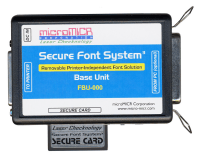
microMICR is pleased to offer
the Secure Font System (SFS)
a printer independent security device that can store printer
resources such as fonts, signatures, logos, forms and macros
in non-volatile memory. The SFS connects to the printers
parallel port and does not need to be connected to a computer
or network. Printer independence means it works with virtually
all Hewlett Packard LaserJet printers and most other companies'
PCL compatible printers as well.

 |
microMICRs Secure Font System (SFS) consists of a base unit, power adapter,
cable and optional secure card. Font resources can be programmed
into either the base unit or the secure card, or both. These
resources are automatically downloaded to the printer when the
device is connected to the printer's parallel port or when the
optional secure card is inserted in the base unit. Font resources
are deleted from the printer when it is powered off. Secure card
font resources are deleted when the card is removed from the
base unit, without affecting the fonts programmed on the base
unit. |
|
microMICRs Secure Font System (SFS) may be used with all models of Hewlett
Packard LaserJet printers which have parallel port connectivity
(except USB or network-only models such as the LaserJet 1000
series and 1320n) and many laser printers from other manufacturers. |
|
For a comprehensive list of LaserJet
printers and the microMICR font devices they are compatible with
use our convenient Compatibility
Table. |

Font
Flash Cards are used in some HP LaserJet printers as an internal
method of adding fonts. They are more convenient to handle than
DIMMs or SIMMs but it is still necessary to open the printer
(side panel) to insert or remove the card.
Font Flash Cards may be used with Hewlett Packard LaserJet 2420,
2430, 4250, 4350, and 9050 series printers.
For a complete list of LaserJet printers and the microMICR font
devices they are compatible with use our convenient Compatibility
Table.

Font
DIMMs are very similar to SIMMs, and are inserted into special
DIMM slots inside the printer. They, also, must be handled carefully
to avoid static damage.
Font DIMMs may be used with Hewlett
Packard LaserJet 2100, 4000, 4050, 4100, 5000, 8000, 8100, 8150,
9000 and color LaserJet 4500 and 4550 printers.
LaserJet 1200, 1300, 1320, 2200 and 2300 series printers use
a special format Version 2 DIMM which is not compatible with
the other HP models. All microMICR DIMMs are available in V2
format.
For a complete list of LaserJet printers and the microMICR font
devices they are compatible with use our convenient Compatibility
Table.

Font SIMMs are designed to be inserted
into a special SIMM slot located inside the printer. Usually
an access panel or door must be opened to access the slots. SIMMs
must be handled more carefully since their electronic components
are exposed.
Font SIMMs may be used with Hewlett
Packard LaserJet 4, 4 plus, 4Si, 4V, 5, 5P, 5Si, and 6P printers.
For a complete list of LaserJet
printers and the microMICR font devices they are compatible with
use our convenient Compatibility
Table.

|
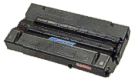
Font Cartridges are inserted into an external slot in
the printer case. Most laser printer manufacturers have discontinued
producing printers with cartridge slots, choosing to utilize
SIMMs or DIMMs to provide the same functionality.
Cartridges provide greater security because they can be easily
removed from the printer and locked safely away, reducing the
potential for misuse of the laser check system or signature font.
Most new model laser printers lack font cartridge capability
but will accept font SIMMs or DIMMs instead
Font cartridges may be used with
Hewlett Packard LaserJet Series II, IID, IIP, III, IIID, IIIP,
4, 4 plus, 4P and 4Si printers. |
|
For a complete list of LaserJet
printers and the microMICR font devices they are compatible with
use our convenient Compatibility
Table. |

Font Cartridges, SIMM
boards, DIMM boards, Font
Flash Cards, and the Secure Font System expand the number of resident fonts available to
laser printers and can add macro capabilities. microMICR offers
standard and custom configurations in all font product formats.
All microMICR font devices devices
may include selections from our font library, as well as signature
or logo images and printer macros. An entire form or letterhead,
including watermark, can be programmed as a macro.
If you are ordering a custom
signature font product, print out our Custom
Signature Template, then complete the form and send it
to microMICR.
For custom logo orders
we need your camera ready art. We also need to know the actual
size or sizes (overall length or height) you would like the printed
images to be. We can scale the image larger or smaller as desired.
Please contact us for assistance. |
|